

 Back
Back
Cut off automated ransomware entry routes to your website
A public website can become an entry point when scanners find an exposed vulnerability, an automated exploit reaches outdated code, or credential attacks break into an administrator account.
ADPAL adds a managed perimeter layer before those web requests reach your CMS or application. It reduces automated reconnaissance, exploit traffic and abusive login attempts while you keep patching, MFA, backups, endpoint security and incident response in place.
.SCALE OF THE PROBLEM
Public software is scanned before anyone decides your business is worth attacking
A business does not need to be manually selected for the first probe. Internet-facing systems are continuously
checked for software versions, login routes, exposed files and known weaknesses. Once automation finds a promising route,
exploitation may follow immediately or the access may be passed to another operator.
For WordPress, Joomla, Drupal, Magento or a custom site, the practical exposure is usually ordinary: outdated components,
weak administrator access, unnecessary plugins, exposed management routes or application flaws that have not been fixed.
Public web software is tested at scale, so prevention should begin before the first successful foothold.
.SNIPPET DEFINITION
What is website ransomware?
Not every hacked website is ransomware. A compromise may instead lead to spam pages, redirects, cryptomining, phishing, malware distribution, data theft or a hidden backdoor. The defining ransomware element is extortion linked to denied access, encryption or threatened disclosure.
Website ransomware is a compromise in which attackers gain control of a website or hosting environment, then encrypt files, lock access or threaten to expose stolen data. Entry can begin with automated scanning, exploitation of vulnerable software or stolen administrator credentials. Perimeter protection can reduce those web routes, but it cannot replace patching, MFA and tested backups.
. HOW ADPAL HELPS
Reduce the automated web routes that can create the first foothold
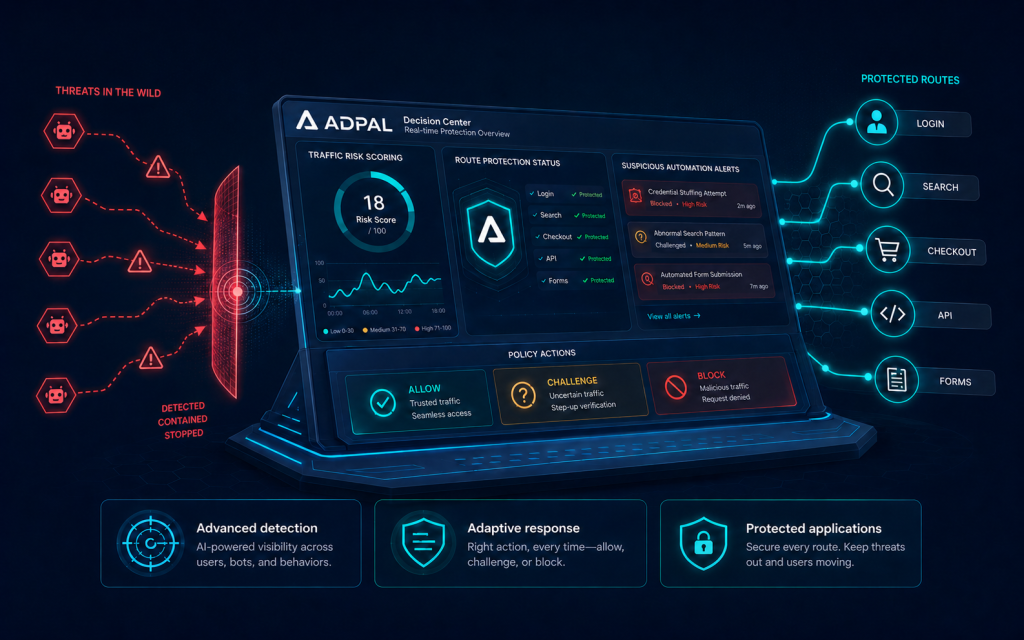
ADPAL sits in front of your public website and filters risky automated requests before they reach the CMS or application.
Reduce reconnaissance
Systematic probing is filtered before it reaches the origin.
Block high-risk requests
Bot, WAF and rate-control policies stop dangerous traffic earlier.
Protect exposed routes
Login, CMS and application endpoints stay behind the perimeter.

adminИзменить профиль
.What it looks like
How an automated web compromise can reach a
small clinic
The example below is illustrative and shows a realistic compromise path for a small business website
A dental clinic uses WordPress for bookings. One old gallery plugin remains installed because removing it might disturb the design. A scanner requests several plugin paths and recognises the vulnerable version.
An exploit request reaches the site and creates unauthorised access. Nothing visible changes. The booking form still works, so the event looks like another harmless line in the server log.
Days later, the attacker uses the foothold to access files and credentials. The site is taken offline during extortion, and the clinic cannot confirm whether patient enquiries or booking data were exposed. A clean backup exists, but nobody has tested a full restore.
The business problem is no longer one outdated plugin. It is service downtime, forensic uncertainty, customer communication, credential rotation, restoration and proof that the original access path is closed.
The final extortion step may be automated or human-operated. The useful prevention point is earlier: reduce the scanning,
exploit and credential traffic that can create the foothold.
. Symptoms
Signs your website is being mapped, probed or accessed
Reconnaissance often appears before a visible incident. Review edge, host, CMS, authentication and file-integrity signals together.


Requests for CMS login routes from sessions that never viewed a normal customer page.
Repeated hits on plugin, theme, backup, configuration or diagnostic paths that do not exist on your site.
Enumeration of usernames, authors, API routes or software-version files.
Bursts of failed administrator logins, password resets or XML-RPC authentication requests across many IP addresses.
Requests containing command injection, path traversal, file inclusion, SQL injection or remote-code-execution patterns.
Unexpected POST requests to upload, import, installer or plugin-management endpoints.
A sudden increase in 404 responses across systematic path lists.
New administrator accounts, API keys, OAuth apps or Search Console owners that nobody approved.
Changes to core files, themes, plugins, scheduled tasks or server configuration.
Unknown PHP, script or archive files appear in writable directories.
Outbound connections reach unfamiliar hosts or security monitoring is unexpectedly disabled.
Unexplained redirects, spam pages, browser warnings or inaccessible backups appear alongside other anomalies.
Recognise several signs? It is worth checking
Pattern to remember
A probe is not proof of compromise. An unknown administrator, altered code, malicious file or unexplained outbound connection is more urgent than routine scanner noise.
.Business impact
What a ransomware-related website compromise can cost
The visible outage is only the start. Recovery has to answer three questions: what changed, what data was reachable
and whether the attacker still has access.

Lost bookings, sales and enquiries
A disabled checkout, contact form or booking system stops revenue immediately. A partially working site can be worse if customers submit data into an untrusted environment.

Forensic and restoration work
A safe recovery means finding the entry route, identifying persistence, rebuilding or cleaning systems, rotating credentials and validating the result.

Data-breach assessment
If personal data may have been accessed, the business may face legal, contractual and customer-notification duties. This requires evidence, not guesses.

Search, browser and SEO disruption
Malware, deceptive content, redirects and downtime can trigger browser warnings, damage crawlability and reduce trust. Security cleanup comes before SEO repair.

Backup uncertainty and reinfection
A backup is useful only if it is clean and restorable. Restoring files without closing the entry route or removing persistence can place the site straight back at risk.

Credential and integration exposure
CMS accounts, hosting panels, databases, email, payment keys, API tokens and third-party integrations may all require review and rotation.
The most expensive outcome is often uncertainty. A small team may need to restore service while also proving that the original access route is closed and that customer-facing systems can be trusted again.
.How the attack works
From internet scan to extortion: how the web entry chain works
A website-focused ransomware incident usually starts well before the ransom note. The public route creates the foothold; persistence, discovery and extortion follow after access has been gained.
01
What happens
Discovery and fingerprinting
Automation finds the domain, CMS, login routes, plugins, themes, files and public endpoints.
What helps
Asset inventory, reduced attack surface, edge visibility and systematic-probing detection.
02
What happens
Initial access
An exploit reaches vulnerable code or administrator credentials are abused.
What helps
Patching, MFA, WAF or virtual patching, secure hosting access and login protection.
03
What happens
Persistence
The attacker creates a backdoor, account, scheduled task, web shell or hidden token.
What helps
File-integrity monitoring, least privilege, audit logs and incident detection.
04
What happens
Discovery and collection
Files, databases, secrets and backups are mapped; data may be copied before disruption.
What helps
Segmentation, secrets management, restricted service accounts, monitoring and egress controls.
05
What happens
Extortion or disruption
Files are encrypted, access is locked or stolen data is used as leverage.
What helps
Tested isolated backups, response planning, legal and provider contacts, and safe recovery procedures.
Common web entry routes

Vulnerable CMS or plugins
Known flaws in public components can create file upload, code execution, account takeover or data-access paths.

Administrator credential abuse
Password attacks or stolen credentials can provide legitimate-looking access without exploiting code.

Exposed management routes
Installers, admin panels, debug endpoints and old maintenance functions expand the public attack surface.

Upload and import functions
Poorly protected upload, import or plugin-management workflows can become execution or persistence routes.

Hosting and API access
Compromised hosting panels, API keys or service accounts may bypass the visible CMS login completely.

Automated exploit scanning
Internet-wide scanners test known paths and payloads quickly after vulnerabilities become public.
Website ransomware vs website malware
Website malware is the broader category: malicious code can redirect traffic, mine cryptocurrency, steal data, host phishing or create a backdoor. Ransomware is a narrower extortion outcome involving encryption, denied access or threatened disclosure. A website-focused perimeter can reduce public web exploitation, but it cannot stop phishing, infected office devices or stolen credentials used outside the protected route.
WAF vs bot protection → · Already compromised? →
. How ADPAL prevents it
How ADPAL stops scraping without blocking useful crawlers
The challenge is not blocking every bot. It is separating legitimate automation from unauthorised data extraction ADPAL evaluates requests at the perimeter before the origin serves product pages, prices, stock data or structured API responses. It combines behaviour and browser characteristics, request sequence, network context and crawl patterns instead of relying on an IP address or user-agent name aloneThis wider context helps identify headless browsers, rotating residential IP addresses, direct API requests and scrapers that deliberately imitate human browsing. A declared crawler name is treated as a claim, not proof of identity ADPAL should complement robots.txt, API authentication, rate limits, access controls and commercial data-use policies. Those measures define permitted access; perimeter filtering helps enforce it against automation that ignores the rules
01
Observe how the visitor discovers and requests product data
02
Identify repeated extraction across pages, sessions and endpoints
03
Verify recognised search engines and approved business tools
04
Apply rules by crawler identity, path, request rate or business purpose
05
Allow, monitor, limit, challenge or block traffic according to policy
06
Review crawl outcomes and adjust protection as the catalogue changes
.How ADPAL prevents it
How ADPAL reduces automated web entry routes
At the perimeter, ADPAL combines bot controls, WAF rules and rate policies around the web routes most exposed to automated reconnaissance, exploit attempts and abusive authentication traffic.
Advanced detection evaluates behaviour, browser, network, request sequence and endpoint activity together. WAF controls can address known exploit patterns, while bot and rate policies reduce automated reconnaissance and abusive login traffic.
High-confidence malicious automation can be blocked or limited before it reaches the origin. Most genuine users continue normally. Adaptive CAPTCHA appears only in rare, uncertain cases.
Virtual patching can temporarily reduce exposure to a known web vulnerability while the permanent application fix is prepared. It buys time; it does not remove the vulnerable code. Patch or replace the component as soon as practical.
ADPAL does not clean an infected server, decrypt files, prove that data was not stolen or replace updates, MFA, endpoint security, isolated backups and incident response. If access already exists, containment and eradication come first.
01
Observe scanning, login and application requests before they reach the origin.
02
Evaluate behaviour, browser, network, request sequence and endpoint context together.
03
Apply WAF, bot and rate-control policy to high-risk automated activity.
04
Keep verified search engines and trusted automation available through policy and allowlists.
05
Review per-request events during monitoring and tune enforcement against real traffic.
.Proof
Proof that belongs
on this page
Built for small teams
Built for SMB website protection – without pretending
to be a full ransomware stack

Automated reconnaissance filtering
Reduce systematic probing of CMS, login, plugin, API and predictable application routes before they consume origin resources.

Application-layer WAF controls
Block known web exploit patterns and use virtual patches where supported while the underlying software is fixed.

Administrator-login protection
Apply bot and rate controls around covered CMS and application login flows before abusive requests reach them.

Treat admin, upload, API, search and public content routes according to their risk and business purpose.

Keep legitimate search engines, monitoring and trusted integrations available through verification or allowlists.

Review request-level events, targeted routes and policy outcomes without building a separate security tool for each web symptom.

Monitor real traffic first, define exceptions and move into enforcement gradually without breaking administration or customer journeys.

Point your DNS at the managed reverse proxy – live in hours, then a short monitoring period before enforcing. CMS-integrated deployment is available through hosting partners.
Privacy at a glance: Cookieless, no cross-site tracking profiles, EU (Frankfurt) data residency. The commercial value is a stronger perimeter around the website, while patching, MFA, secure hosting, endpoint protection, backups and incident response remain in place.
Explore Bot Protection →
Active compromise →
. DIY vs. perimeter
What you can do yourself – and
where each layer helps
Measure
Helps?
The practical limit
Keep CMS, plugins, themes and server software updated
Essential
Prioritise supported software and actively exploited vulnerabilities. Updates close known flaws; they do not remove an existing compromise.
Delete unused components
Essential
Inactive code can still expand the attack surface when files remain public or writable.
MFA and unique administrator credentials
Essential
Reduces credential-based entry. Use separate hosting, CMS, database and email accounts with least privilege.
Restrict management routes
Strong layer
Limit admin and hosting access by role, network, VPN or identity control where practical. Keep an emergency-access process.
WAF and virtual patching
Useful compensating control
Can block known exploit patterns while a real patch is tested. It cannot fix every flaw or inspect every route.
Rate limits and login protection
Useful
Stops noisy abuse. Distributed low-volume attempts need broader behavioural and request context.
Bot and scanner filtering
Useful perimeter layer
Reduces automated reconnaissance before requests reach the CMS. It does not remove a backdoor already present.
File-integrity and account monitoring
Detection layer
Alerts on unexpected files, code changes, administrators or scheduled tasks. It requires investigation and a known-good baseline.
Tested, isolated backups
Essential recovery layer
Backups support recovery; they do not prevent entry. Keep separated recent copies and test restoration.
Endpoint security and incident response
Separate essential layer
Protects office devices and defines isolation, evidence, communications and recovery. It sits beyond website perimeter filtering.
Actionable first step today
Open the CMS component list. Update supported software, delete unused components and create a dated inventory. Then confirm that at least one clean backup can be restored outside the live hosting environment.
.Learn more
Go deeper on website compromise and recovery
Guide
Bot attack symptoms – and what to do

Guide
How to prevent cyber fraud on your website
Checklist
Website ransomware readiness checklist
.FAQ
Questions about website ransomware protection
What is website ransomware in simple terms?
It is an extortion incident involving a website or hosting environment. Attackers may encrypt files, lock administrative access or threaten to expose copied data. The entry route may be a vulnerable component, stolen credential, exposed hosting account or another weakness.
Does ransomware always begin with a bot?
No. Automated scanning and exploitation are important routes, but ransomware can also begin through phishing, stolen credentials, remote access, supply-chain compromise, insider access or a compromised service provider. This page focuses on public website and CMS routes.
How can a vulnerable plugin lead to ransomware?
A serious flaw may allow unauthorised file upload, code execution, account takeover or database access. The attacker can then install persistence, steal credentials or move further into the hosting environment. The vulnerability creates access; ransomware or extortion is a later choice.
Is ADPAL an antivirus or backup product?
No. ADPAL protects covered web and API routes at the perimeter. Endpoint security protects computers and servers from malware execution. Backups support recovery. A complete ransomware programme needs these layers to work together.
Can a WAF protect an outdated CMS?
It can reduce exposure to known exploit patterns and provide a temporary virtual patch. That buys time; it does not remove vulnerable code. Patch, replace or remove the affected component as soon as practical.
Will ADPAL remove malware or a web shell that is already installed?
No. Existing compromise requires containment, investigation, eradication and recovery. Isolate the affected service, preserve evidence, identify persistence, rotate credentials, restore from a verified clean backup and close the entry route.
Can a hacked website lose rankings?
Yes. A compromise can reduce visibility through downtime, blocked crawling, injected pages, redirects or browser warnings. Secure and clean the site first, then validate indexing, canonicals, sitemaps and important landing pages.
Should the backup stay on the same hosting account?
Not as the only copy. Keep separated recent backups with protected credentials and test restoration. A copy that attackers can delete or encrypt with the live system does not provide reliable recovery.
Does hiding the WordPress login URL stop attacks?
It can reduce commodity noise, but it is not a primary security control. Use MFA, least privilege, rate controls, logging, patching and perimeter policy. The login route may still be discovered through scripts, APIs or fingerprinting.
Can a small website really be targeted?
Yes. Automated scanners test internet-facing software at scale, so the site does not need to be famous. Exposure still depends on software, maintenance, credentials, hosting and attacker goals; small sites are not automatically the preferred target.
Will perimeter protection stop ransomware on office laptops?
No. Email attachments, malicious downloads, compromised endpoints and stolen workstation credentials require endpoint security, email protection, staff training, patching and device management outside the website perimeter.
What should I do if the site is already compromised?
Do not rely on a new security plugin and continue operating. Isolate the affected service, contact the host and incident-response support, preserve logs, remove unauthorised access, rotate credentials, restore safely and assess possible data exposure. Start with our Under attack guide.
What should I do if Google shows a security warning?
Investigate the affected URLs and third-party resources, remove malicious or deceptive content, close the security gap and use Search Console to request a review after cleanup. Security recovery comes first; indexing and SEO checks should follow once the site is trustworthy again.
Block the web entry route – and prepare for
the routes one product cannot cover
Ransomware resilience is layered. Patch the software. Protect administrator access. Keep isolated, tested backups.
Prepare the response plan. Then reduce the automated scanning, exploitation and login abuse reaching the website.
Start with a clear view of who is probing the site and which public routes create the greatest risk.

No credit card
Cookieless, no cross-site tracking profiles, EU (Frankfurt) data residency